Conversion Tracking
Organic Tracking
Organic Tracking
Overview of Organic Tracking Technology
Tracking Organic Traffic is not hard. This is how we do it circa July, 2024.
First of all, we have to create a local storage variable. We called ours, "lastFormattedReferrer" this variable needs to only store the domain name of the referrer. So we remove everything in the URL besides the domain, and if there is a subdomain, that subdomain will be preserved as well. Anything after the domain will also be removed as it is not necessary if we are tracking organic conversions.
Examples:
| Source URL Example | Value Stored |
| https://example.com | example.com |
| https://www.example.com | example.com |
| https://subdomain.example.com | subdomain.example.com |
| https://www.subdomain.example.com | subdomain.example.com |
We utilize JavaScript to perform all of these actions at page load inside of Google Tag Manager. We will touch on this later.
We also check several conditions before we store these values.
- We check that there is a referrer
- This could be false if:
- The URL was directly typed into the URL bar
- The source link had a noreferrer HTML attribute. (This is common on Facebook)
- This could be false if:
- We check that the referrer is not a page within the same domain
- This prevents the variable from being set if the initial referrer was false but a new page within the domain was opened.
- We check that the variable "lastFormattedReferrer" has not already been set before.
This prevents the variable from being overwritten from "google.com" to "bing.com" if the user used both of those sites to get to the target site. It should show us the true first site the user landed on the target site from.
Although when set, the variable should return true to Google Tag Manager. However the value should be stored. So that in the future modifications could be made to return the stored value to our organization for reporting.

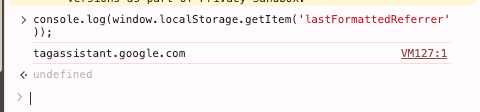
Returning a value of true and saving the actual value allows more flexibility in the future if we want to modify our tracking parameters in the future.
Setup Procedure
Google Analytics Setup
Setup Key Event
-
Within Google Analytics navigate to the Admin section "Gear Icon in the bottom left corner"
-
Open the "Property settings" accordion, and click into "Key events"
- Click "New key event" and name the event "OrganicContactForm"
- You can name it something else if you want as long as you use the name consistently throughout this process.
Setup Google Analytics in Tag Manager
- In the Admin section Open the "Data collection and modification" accordion
- Click "Data streams"
- Click on the data stream (there should typically only be one)
- Under "Measurement ID" click the copy icon
- In Google Tag Manager (Different Website) create a new tag
- Use the Google Tag type, and paste the measurement ID into the Tag ID in the Tag Configuration.
- Add a trigger so that it will fire on all pages.
Google Tag Manager Setup
Within Google Tag Manager you will need to configure a "User-Defined Variable." This can be done by navigating to "Variables" inside of the "Workspace."
- Within the "User-Defined Variables" tab click "New"
- Click on "Variable Configuration"
- Click "Custom JavaScript"
- In the box paste the following code:
function() { if (document.referrer != null) { var formattedReferrer = document.referrer.split('/')[2].replace(/^www\./, ''); var sessionHasReferrer; var lastFormattedReferrer = window.localStorage.getItem('lastFormattedReferrer'); if (document.referrer == "") { //Checks for either direct URL or noreferrer link attribute sessionHasReferrer = "False"; } else if (document.location.host == formattedReferrer) { //Checks for document referrer being of the same site sessionHasReferrer = "False"; } else { //Thus the referrer is External sessionHasReferrer = "True"; } if (!lastFormattedReferrer && sessionHasReferrer === "True") { //set lastFormattedReferrer window.localStorage.setItem('lastFormattedReferrer', formattedReferrer); } } if (lastFormattedReferrer) { return (true); } } - Name the variable "lastFormattedReferrer"
- Click "Save"
Repeat the same steps for the Google Ads Cookie
- Within the "User-Defined Variables" tab click "New"
- Click on "Variable Configuration"
- Click "Custom JavaScript"
- In the box paste the following code:
-
function() { return document.cookie.split(';').some(function(item) { return item.trim().startsWith('_gcl_aw='); }); } - Name the variable "Google Ads Cookie"
- Click "Save"
Even though there is no trigger to launch this code, it will initialize with the page load, since it is configured as a variable. You will need to have Google Analytics configured in the Google Tag Manager Workspace.
- Navigate to "Tags" in the "Workspace"
- Create a new tag using type "Google Analytics" > "Google Analytics: GA4 Event" for the configuration
- Make sure that the Measurement ID is the same as the Google Analytics Tag ID for the Google Analytics Configuration Tag.
- Name the Event "OrganicContactForm", this will also need to be added as an Event or Key Event in Google Analytics 4 if not already done so.
- Click on Triggering
- This will be mostly the same as when configuring a Google Ads Conversion. For example:
Click - All Elements
The trigger fires on - Some Clicks
Click Classes contains wpcf7-submit - Now, underneath add
lastFormattedReferrer contains true & Google Ads Cookie contains false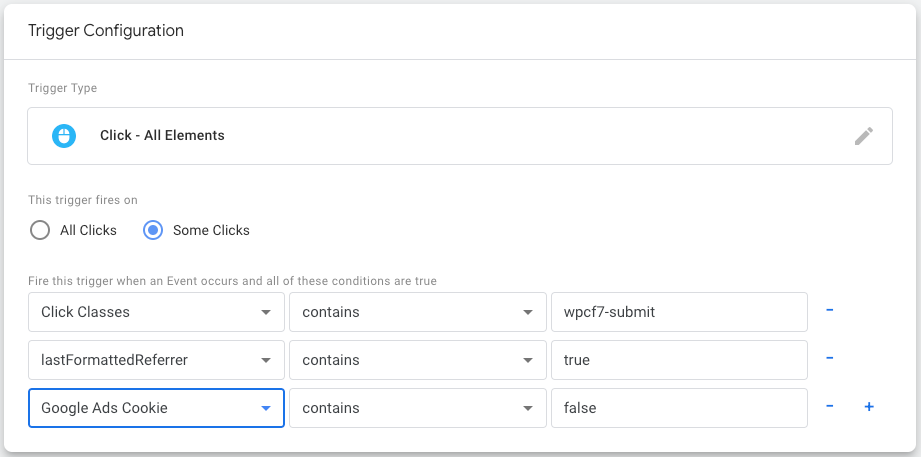
- Save this tag and publish the workspace
Organic Tracking should be configured properly if all steps were followed.
Alternatives & Non-WordPress sites
Is the lastFormattedReferrer not appearing in the webpage's local storage?
I found this can happen with Rocketsites' websites.
A workaround I found is to add the HTTP Referrer variable in Google Tag Manager.
Then, in addition to the lastFormattedReferrer variable, create a custom HTML tag that fires on all pages and use the following version of the lastFormattedReferrer code in the custom HTML tag:
<script>
  if (document.referrer != null) {
                var formattedReferrer = document.referrer.split('/')[2].replace(/^www\./, '');
                var sessionHasReferrer;
                var lastFormattedReferrer = window.localStorage.getItem('lastFormattedReferrer');
                var lastExternalReferrer = window.localStorage.getItem('lastExternalReferrer');

                if (document.referrer == "") {
                    //Checks for either direct URL or noreferrer link attribute
                    sessionHasReferrer = "False";
                }
                else if (document.location.host == formattedReferrer) {
                    //Checks for document referrer being of the same site
                    sessionHasReferrer = "False";
                }
                else {
                    //Thus the referrer is External
                    sessionHasReferrer = "True";
                }

                if (!lastFormattedReferrer && sessionHasReferrer === "True") {
                    //set lastFormattedReferrer
                    window.localStorage.setItem('lastFormattedReferrer', formattedReferrer);
                }
            }
</script>